

Knowing how to mention someone on Instagram story is a must because it can significantly boost your social media engagement. Instagram has made tagging an essential feature for building connections and increasing visibility.
When you tag users in your Stories, you’re essentially creating a bridge to content they might otherwise never see. Tagging is particularly powerful in Reels, perfect for collaborations, featuring friends, or simply giving someone a shoutout.
Additionally, you have options to mention people even after posting your Story, though there are certain limitations worth understanding, so we are here to guide you about all you need to know.
Benefits of Mentioning Someone on Instagram Story?
Tagging friends and creators on Instagram Stories serves multiple purposes beyond simply showing off your social connections. Using mentions strategically can transform how you interact with your audience and Instagram users.
The benefits of knowing how to mention someone on Instagram story include:
- Increased visibility: When you tag someone, they may repost the story to their Instagram, potentially exposing your content to their audience.
- Stronger community building: Mentions create a sense of connection and respect that strengthens your Instagram community.
- Brand collaboration opportunities: Mentioning brands shows them you’re interested in their products and might lead to partnership opportunities.
- Credit attribution: Properly tagging creators when sharing their content shows respect for their work and avoids copyright issues.
- Enhanced engagement: Stories with mentions typically receive more interactions as they encourage the tagged person to respond.
- Networking expansion: Regular, thoughtful mentions can help you connect with influencers and like-minded creators.
- Furthermore, learning how to tag someone on Instagram story after posting gives you flexibility when you forget to include someone initially. This feature is particularly valuable for business accounts that need to properly credit partners or collaborators.
Also, understanding how to mention someone on Instagram story without it showing publicly (using private mentions) allows for discreet communication when necessary.
How to Mention Someone on Instagram Story
Mentioning others in your Instagram Stories is surprisingly straightforward once you know the proper techniques. Let’s explore the three main ways you can mention someone on Instagram Story to maximize your social engagement.

#1 Using the @ symbol in text
The most basic method to tag someone on Instagram story involves using the text tool:
- Create your Story by uploading a video, photo, or multiple photos on Instagram stories.
- Tap on your image or video to add text.
- Type the “@” symbol followed by the username.

- Select the correct account when it appears in suggestions.
- Tap “Done” to confirm.
- Position the text mentioned anywhere in your Story.
- Publish your Story.
This text-based mention notifies the tagged person and allows them to reshare your content.
#2 Using the Mention sticker
For a more prominent and stylish approach to how to mention someone on Instagram story, the dedicated mention sticker works better:
- After creating your Story content, tap the sticker icon (smiling square) at the top.

- Find and select the “@MENTION” sticker.
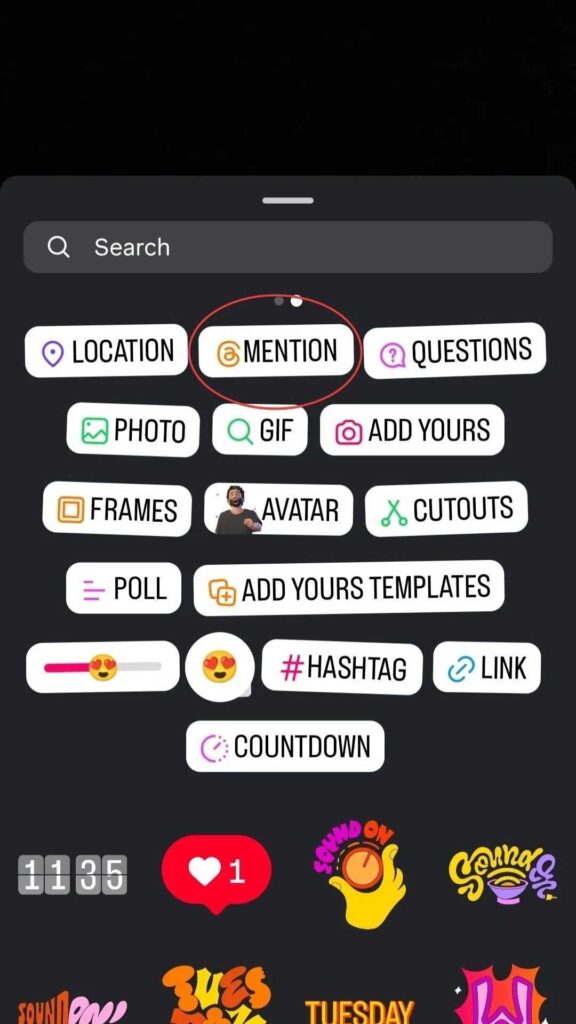
- Type the username you want to tag.
- Choose the correct account from the suggestions.
- Resize the sticker as needed and place it anywhere on the screen.
- Customize by tapping the sticker to change color variations.

The mention sticker stands out more than text mentions because it’s larger and more visually appealing, making it ideal for highlighting collaborations or giving shoutouts.
#3 Tagging multiple users in one story
Need to tag several people at once? Here’s how:
- Use either the text method or the mention sticker approach.
- Repeat the process for each person you want to tag.
- Remember, there’s a maximum limit of 20 people you can mention in a single Story.
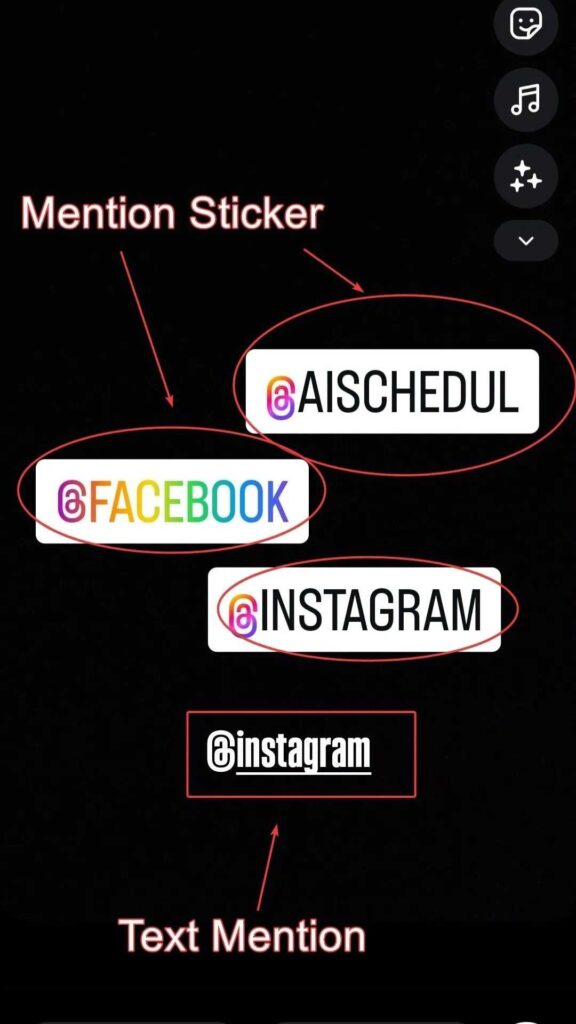
| Mention Method | Visibility | Customization | Best For |
| Text @ Symbol | Standard | Font/color options | Subtle mentions |
| Mention Sticker | More prominent | Size/color variants | Highlighting accounts |
| Multiple Tags | Varies by method | Individual customization | Group content/events |
Once you post your Story, each mentioned user receives a notification and can reshare your content with their followers, thereby expanding your reach and helping you get more views on Instagram Story.
Remember that Instagram Stories only remain visible for 24 hours unless saved as Highlights, so make those mentions count!
How to Mention Someone on Instagram Story After Posting
Forgot to tag someone in your Instagram Story? Fortunately, Instagram offers a solution for those “oops” moments when you need to add mentions after publishing. Let’s explore how this feature works, its effects, and its limitations.
The process to mention someone on Instagram story after it’s already live is straightforward:
- Open your published Instagram Story.
- Tap the three-dot menu (More) on the bottom-right corner of your Story screen.
- Select “Mentions” from the menu options.
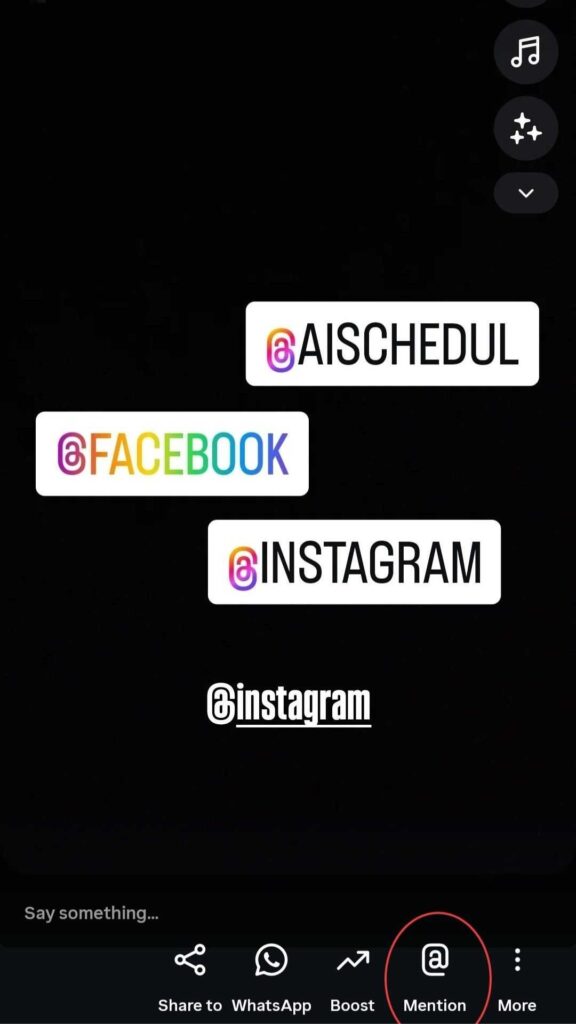
- Search for the username you want to tag or scroll through suggested accounts.
- Tap the circle next to their username.
- Tap “Add” to confirm your selection.
This feature works on both Android and iOS devices, making it accessible regardless of which smartphone you use.
What happens when you mention after posting
After adding a mention to an already published story, several things occur:
- The mentioned person receives a notification in their direct messages with a preview of your story.
- If you mention someone who doesn’t follow you, they’ll receive your mention as a message request.
- Multiple mentions in the same story may create a group chat including all mentioned users.
Importantly, when you tag someone on Instagram story after posting, their username won’t visually appear on your story. This is how to mention someone on Instagram story without it showing visibly in the content itself.
Tips to Mention Someone on Instagram Story
Mastering how to mention someone on Instagram story requires understanding proper tagging etiquette. Beyond knowing the technical aspects, following these guidelines ensures your mentions create positive engagement rather than irritation.

#1 Avoid Over-Tagging
Bombarding your story with multiple tags appears desperate for attention and quickly annoys followers. Even with Instagram allowing up to 20 tags per story, restraint is key. Instead, focus on quality over quantity in your mentions.
#2 Tag Only Relevant Users
Only tag accounts genuinely connected to your content. Mentioning irrelevant profiles feels spammy and unprofessional, potentially damaging your reputation. Remember that tagging creates a notification for that person; make it worthwhile.
#3 Check Usernames Before Posting
Misspelling usernames or tagging incorrect accounts means your intended connection gets missed entirely. Double-check all usernames before publishing to ensure your mentions reach their intended recipients.
#4 Use Mentions to Boost Engagement
When used thoughtfully, mentions can significantly increase your story’s reach. There’s an unspoken social media rule that when you tag someone, they often reshare your content as acknowledgment. This creates a mutual visibility boost without appearing manipulative. Keep in mind that users can control who mentions them in their privacy settings, accordingly limiting unwanted tags.
Final Words
Learning how to mention someone on Instagram story can turn your casual posts into strategic connections that boost visibility and strengthen relationships. Use text mentions, mention stickers, and multiple tags intentionally, and remember the post-publish mention option as a backup when you forget to tag.
Tag thoughtfully: relevance beats quantity, and respectful mentions build genuine engagement that outlasts the 24-hour Story window.
Put these techniques into practice, and your Instagram Stories will start working harder for your brand and community.
FAQs
Can I remove my username from someone else’s Story after they mention me?
No, you can’t remove your username from another person’s Story. You can report the Story or ask the poster to remove it, but Instagram doesn’t provide a way for you to delete your mention yourself.
What happens if you mention someone who doesn’t follow you? Will they get a notification?
Yes, they’ll be notified, but it usually appears as a DM message request (not a regular inbox notification). If they don’t follow you, the mention lands in their message requests; if they follow you, it shows in the main inbox.
Can someone I’ve blocked still mention or tag me?
No, accounts you’ve blocked can’t mention or tag your username. Blocking prevents mentions, tags, and direct interactions.
Can I stop everyone from mentioning me?
Yes, you can go to Settings → Privacy → Mentions and choose Everyone, People You Follow, or No One. This is the official way to limit mentions (works for stories, posts, comments, live).
 English
  Spanish